Due today, overdue, scheduled, missing a next date, closed, or stopped for review.
Free Excel and Google Sheets tracker - no email gate
Know which quote needs a next action today.
Download a practical quote follow-up tracker for open estimates, due dates, owners, channel permission, stop signals, next actions, and verified outcomes. The workbook organizes the work but sends nothing.
17,975-byte .xlsx file. No account, form, cookie, email signup, payment, or automatic message.
Manual-first by design. Add only requested quotes or existing business conversations. Confirm the person, channel, estimate version, and context before each follow-up. A prior quote does not create unlimited contact permission.
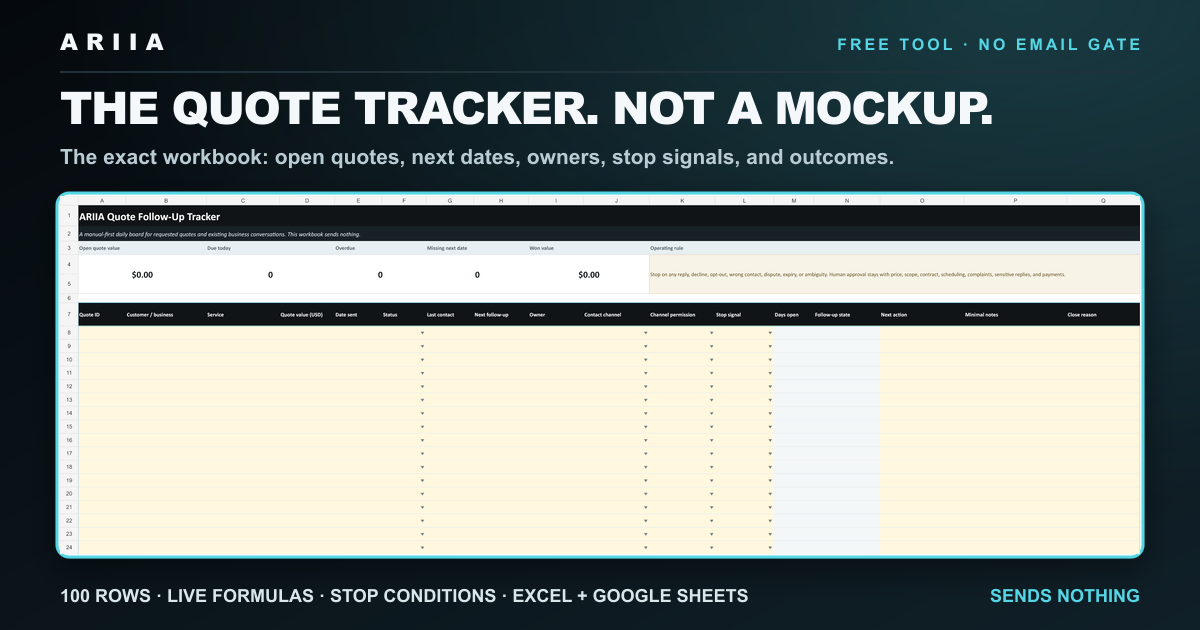
The daily view is intentionally small.
The workbook opens with five operational totals and one filterable table. It is designed for a focused morning review, not to replace your estimating, field-service, accounting, or payment system.
Status, last contact, next date, owner, approved channel, permission state, and stop signal.
Won, lost, paused, or expired status plus the verified reason and minimal notes.
Use the tracker in five minutes.
- Download the workbook and open it in Excel or import it into Google Sheets.
- Add only current requested quotes. Do not paste passwords, payment details, identity documents, health information, or unrelated confidential data.
- Set the status, next follow-up date, channel permission, and stop signal. The follow-up state calculates automatically.
- Filter to Due today or Overdue and work from the actual customer context rather than a generic blast.
- Record a reply or stop signal before taking another action. Route ambiguity, disputes, complaints, and sensitive replies to a person.
- Close the quote with a verified outcome. Treat quote value as an operational field, not as revenue.
Automation should reduce forgetting, not remove judgment.
The workbook can safely help you
- keep one next date and owner visible;
- separate due, overdue, scheduled, and closed quotes;
- record channel permission and stop signals;
- prepare a clear next-action list; and
- reconcile outcomes without claiming a result.
Keep these actions human-controlled
- price, discounts, and scope changes;
- contracts and scheduling commitments;
- complaints, disputes, and sensitive replies;
- contact after a decline, opt-out, or wrong address; and
- invoices, payments, refunds, and revenue verification.
Never invent a deadline, scarcity, price change, availability, customer interest, or authority. Silence does not authorize an endless sequence. Stop on a reply, decline, opt-out, wrong contact, dispute, complaint, expired estimate, or other stop signal.
Download the workbook, then inspect your real process.
The tracker includes 100 editable rows, live summary formulas, dropdowns, conditional follow-up states, a Quick Start sheet, and direct links to the free ARIIA templates and checklist.
Educational operating template. No replies, sales, savings, close rate, or revenue outcome is guaranteed.
Quote tracker questions.
Does the tracker send follow-up messages?
No. It is a manual-first workbook. It organizes dates, owners, stop signals, and next actions but has no messaging connection, script, macro, or automatic sequence.
Does it work in Google Sheets?
Yes. Download the .xlsx file and import it into Google Sheets. Verify the dropdowns, date formats, and formulas after import because spreadsheet applications can render some formatting differently.
What should a quote follow-up tracker include?
At minimum: a quote identifier, customer or business, service, value, date sent, status, last contact, next follow-up, owner, approved channel, permission state, stop signal, next action, minimal notes, and final outcome.
Is open quote value the same as revenue?
No. Open and won quote values are operational fields. Revenue should be verified from the payment provider, recorded only after settlement, and reduced by confirmed refunds.
What does the paid ARIIA audit include?
The separate USD $497 AI Operations Audit covers one agreed workflow, its as-is handoff map, one priority blueprint, measures, and a 30-day action plan. Implementation is separate, scope and timing are confirmed before payment, and no response, conversion, savings, or revenue outcome is guaranteed.
When the tracker exposes a recurring handoff problem.
The free scorecard stays in your browser. A fit request is transmitted only after explicit contact consent and a separate final action; it creates no invoice, purchase, subscription, or payment request.